MP3Juices Feature by Feature: What Each Tool Actually Does
This review does not hand out a single overall score. Instead, it judges each capability of mp3juices.art on its own merits, so you can decide which parts of the platform are worth your time and which ones you can ignore. MP3Juices is a free web-based music search and download tool that lets visitors find songs, preview them, and save audio or video files without creating an account.
Below, every major feature gets its own mini-review with a short verdict, followed by a closing summary of how the pieces fit together.
Music Search: The Core Engine of the Platform
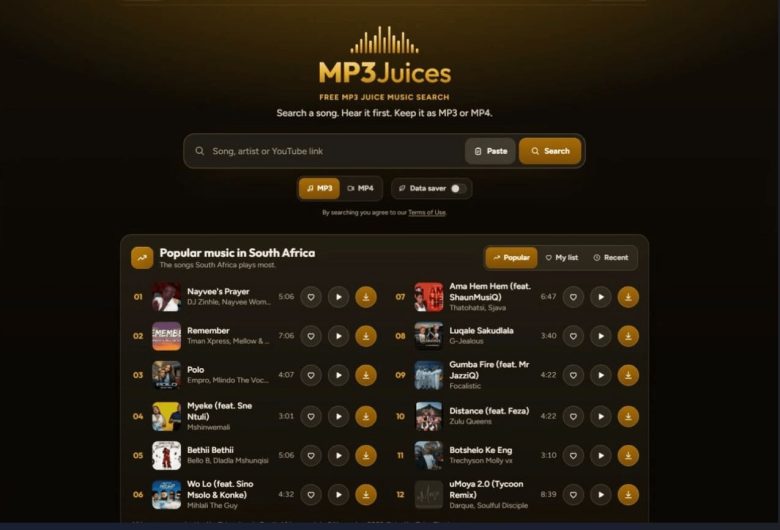
The search bar is the entry point for almost everything else on the site. You type a song title, an artist name, or a few keywords, and the tool returns a list of matching tracks pulled from its indexed sources. Results typically show the track name, artist, duration, and available formats, which makes it easy to scan before committing to anything.
The search is broad rather than precise. It works best when you already know roughly what you are looking for, and it handles partial queries reasonably well. What it does not do is offer advanced filters like bitrate, year, or album, so power users who want granular control will find it basic.
Verdict: Fast and forgiving for casual queries, but light on filtering for detail-oriented users.
Listen Before You Download: Preview That Saves Regret
The preview function lets you play a track in the browser before you download it. This matters more than it sounds: search results can include covers, live versions, remixes, and low-quality rips that look identical in a list. Hearing the first few seconds is often enough to tell whether a result is the version you actually want.
Preview playback happens inside the page, so there is no need to open a separate player or install anything. It is a small feature on paper, but in practice it prevents the most common frustration of download sites — saving the wrong file and discovering it later.
Verdict: One of the most useful features on the site, and the one that most improves the overall experience.
MP3 Download: Format, Quality, and Practical Limits
The MP3 download option is the platform’s headline capability. Once you pick a track, you choose the audio format and the file is prepared for saving to your device. MP3 remains the most compatible audio format in existence, which is why it is the default choice for most visitors.
Quality depends on the source file rather than on the tool itself. A track that was uploaded at a low bitrate will not become high-fidelity just because it passes through a downloader. Users who care about audio quality should treat the preview as a rough guide and expect variation between results.
Verdict: Reliable for everyday listening, but set your expectations by the source, not the format label.
MP4 Download: When You Need the Video Too
The MP4 option extends the platform beyond audio. If a result is linked to a video source, you can save the visual version instead of, or alongside, the audio. This is handy for music videos, live performances, and anything where the visuals are part of the appeal.
MP4 files are naturally larger than MP3 files, so storage and data usage climb quickly. The tool does not offer granular resolution controls in the way dedicated video downloaders do, which keeps things simple but limits fine-tuning.
Verdict: A welcome bonus for video content, though audio remains the stronger use case.
Genre and Artist Browsing: Discovery Without a Search Query
Not every visit starts with a specific song in mind. The genre and artist browsing sections let you explore music by category or by performer, which turns the site into a lightweight discovery tool rather than a pure lookup service. It is useful when you want to sample a style or revisit an artist’s catalogue.
The browsing experience is functional rather than curated. You will not find editorial descriptions or hand-picked playlists here — just organised entry points into the catalogue. That is fine for what it is, but listeners who want guided recommendations will need to look elsewhere.
Verdict: Good for casual exploration; not a substitute for a recommendation engine.
Charts, Personal List, and Data Saver Mode
Charts
The charts section surfaces popular tracks, giving you a quick snapshot of what other users are searching for and downloading. It is a practical shortcut when you have no particular song in mind and want to see what is trending on the platform.
Verdict: A simple popularity shortcut that works best as a starting point, not a discovery tool in its own right.
Personal List
The personal list feature lets you collect tracks you are interested in without downloading them immediately. It functions as a lightweight saved-items area, useful for building a shortlist while you browse. Because the site requires no account, treat the list as a convenience rather than a permanent library.
Verdict: Handy for session-based shortlisting; not a long-term collection manager.
Data Saver Mode
Data saver mode reduces the amount of data the site consumes while you browse and preview. On mobile connections or metered plans, this is a genuinely thoughtful addition that many competing tools overlook. It is a small toggle with a real practical benefit.
Verdict: A quiet quality-of-life feature that mobile users will appreciate.
No Account, No Install: The Access Model Reviewed
The entire platform runs in a browser. There is no sign-up, no email verification, and no software to install, which removes the usual friction of download tools. For a visitor who wants one song quickly, that is exactly the right design choice.
The trade-off is the absence of persistent user data: no synced library, no download history across devices, and no personalised recommendations. The platform is built for immediate use rather than long-term relationship, and it is honest about that.
Verdict: Excellent for quick, anonymous use; limited for anyone who wants an account-based music library.
How the Features Work Together
Taken individually, most features on mp3juices.art are modest: a search bar, a preview player, two download formats, browsing by genre and artist, charts, a personal list, and a data-saving toggle. Taken together, they form a coherent workflow — search or browse, preview, shortlist, then download in the format you need.
The weakest links are the ones that promise more than they deliver: browsing lacks curation, and quality control is limited by the source material. The strongest are the preview player, the no-account access model, and the data saver mode, each of which solves a real problem for real users.
If you judge the platform feature by feature rather than as a single product, the picture is clear: it is a dependable utility for finding and saving music quickly, with a few rough edges that are easy to work around. Use it for what it does well, and it will serve you without much fuss.